
One customer, read end to end
- Trigger
- POST /relay
- Lands in
- The contact record
- Setup
- 2 min
- Needs
- Nothing else
 Viably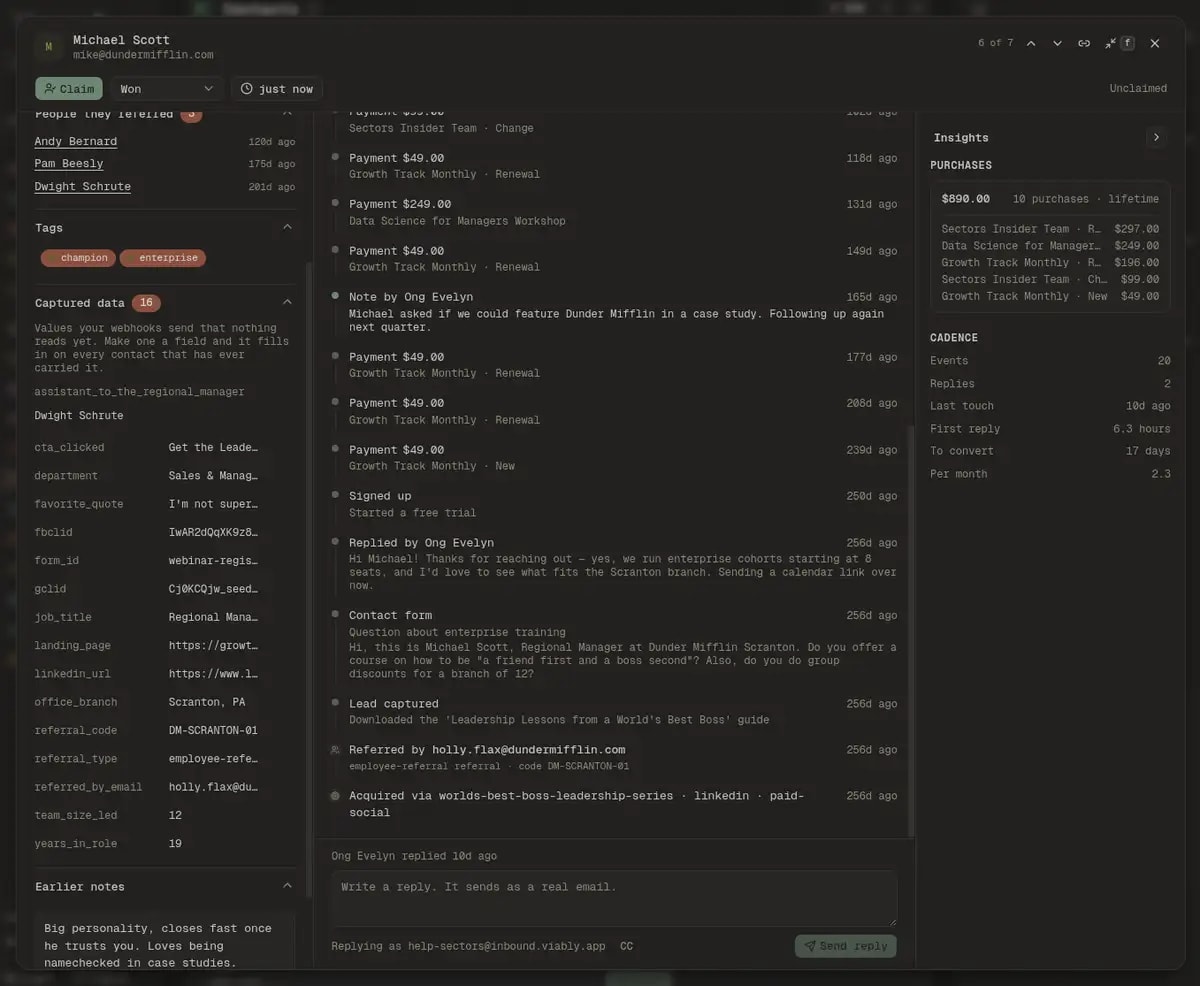
What a single source of truth actually buys you
The phrase is worn out, so it is worth being concrete about what changes when every channel writes to one place instead of four. The email address is the key, and every capture path resolves to it before anything else happens.
The enquiry your support inbox took, the payment Stripe reported, the WhatsApp conversation that started on your pricing page, and the note somebody wrote after the call are the same record. Nobody has to join three systems in their head before answering an email.
Entries are events with a time on them, kept in contact_events rather than in the relay log, so the history outlives the log's retention window. Notes carry an author and a date, payments carry the figure and its currency, and a merge says so on the rows it brought in.
Underneath the oldest event sit the two facts that predate all of them: who sent this person, and which campaign won them. Both are read off the contact's own first-touch fields, so they stay true even when the event that carried them has scrolled out of the loaded window.
Lifetime value on its own is a number without a question attached. Beside it Viably puts what an average customer from the same channel is worth, which turns the figure into something a marketer can act on this afternoon.
The timeline, and the two facts underneath it
Newest first, one entry per thing that happened, each carrying its own detail: a subject line, a message body, an amount and its currency, the attachments that came with it. Below the oldest event sit two entries that are not events at all, because they are facts about the arrival rather than moments within it.
Lead forms, signups, contact forms, inbound email, WhatsApp enquiries, scanned business cards, and payments, each labelled in the words a person would use rather than the token your payload sent. The endpoint that delivered it is named underneath.
Replies sent from the record and from the Slack card, and outbound messages for the people you reached out to first, both attributed to the member who wrote them. The response-time figures elsewhere in the product are computed from these same rows.
A note is one box at the top of the timeline, and a figure mentioned inside it is offered as a payment rather than silently parsed. Write “signed for 45m IDR” and Viably asks whether to record it, which is how the sum stops living only in prose.
A cancellation scheduled and a subscription ended are marked out on the rail, because on a customer's history they are the one thing somebody is looking for. Both carry the plan name that left with them.
Referrals, read in both directions
A signup payload carrying an address in referred_by_email is stating a relationship between two people. Left in the payload it is a string nobody reads. Stated on the record it names the customer who did the selling for you, and the two records point at each other.
Bob's record now says he was referred by Michael, with partner referral · code MIKE20underneath, and Michael's record gains a People they referred section listing him.
- The person who was referred: an entry at the foot of their timeline, dated to their arrival, linking to the referrer when that address belongs to a contact you hold and naming the address plainly when it does not.
- The person who referred them: a section on their own record listing the people they have sent you, newest first, with a running count of the lot. A customer who has brought three others is worth knowing about before you pick up the phone.
- The section opens by default on the few contacts that have one, because a shut heading reading People they referred gets read after the call rather than before it.
Your own fields, mapped from what you already send
Every business has three or four facts about a customer that no CRM vendor anticipated: a plan tier, a school, a fleet size, a broker code. Viably has been storing yours since you switched the relay on, and defining a field is the act of saying which of those keys means something and what kind of thing it is.
Every scalar key a payload carries that Viably does not consume structurally is kept on the contact. An admin opening a record sees them under Captured data with this contact's values beside them, so defining a field starts from evidence rather than from memory of what the form asks for.
The type is guessed from the value in front of you, so 2026-03-14 opens as a date and https://… as a link. Confirm it and the field fills in on every contact that has ever carried that key, back through your whole history, with no backfill job to run.
Values a person types are stored apart from the captured ones and resolved first, so tomorrow's payload cannot wipe today's correction. Where the two disagree the field says what the webhook sends, quietly, underneath.
Choice and yes / no fields become facets on the contacts queue at no query cost, because their values are already written down in the definition. Up to two fields can be pinned to show as columns in the table.
When one person arrives twice
Single source of truth is a claim about identity before it is a claim about storage, and identity is where these systems usually fail quietly. Somebody fills in a form with their work address, pays with a personal card, and answers from a phone. Here is what Viably does about that.
Pick which record survives and the other's events, revenue, and history move onto it, with the losing addresses kept as aliases. A later event sent to one of those addresses resolves back to the survivor instead of re-creating the duplicate you just cleared.
After a merge, an event that arrived at a folded-away address reads “Signed up as [email protected]”. Without that line a signup sitting after its own payment looks like a bug, when it is the honest order of two accounts belonging to one person.
When somebody answers your email from an address the CRM has never seen, capture makes a new contact, correctly, and Viably asks whether the two are the same human. The evidence is a thread match, which proves the sender was on the thread rather than that they own it, so it asks rather than acts.
Duplicate deliveries are dropped at capture, so a webhook retried three times leaves one entry. Your event counts and the cadence figures beside them are counting things that happened rather than things that were sent.
What they are worth, with a scale beside it
Every figure in this panel is derived from the events already on screen and the contact's own row, so opening the money costs no further query. What it is careful about is the difference between a number that is true and a number that is useful.
The headline comes off the contact row and is right the moment the record opens. Under it, the purchases roll up one line per product, split by whether the money was new, a renewal, or a plan change, so somebody who moved up a tier reads as having done exactly that.
A customer worth three times the average of the source that found them says something about both the person and the channel. The comparison appears as a bar and a sentence, and stays quiet when the customer is within a whisker of average, because that is a row of furniture rather than a finding.
Events, replies, days since the last touch, the time your team took to answer first, and the events per month this person generates. Every one of these is read off the timeline already loaded, so the panel costs no extra query.
The days between meeting somebody and taking their money, on the record rather than only in the aggregate. It is the figure that tells you whether a quiet lead is genuinely cold or simply slower than the last one.
Reach them from the record, on the channel they used
A record you can only read is a filing cabinet. The top of every contact carries the ways to reach this particular person, offered as things to do rather than strings to copy, and everything you send comes back onto the history underneath.
The reply box sits at the foot of the record with the whole relationship above it. What you send goes out from your workspace inbox address, threads against the original message, lands on this timeline, and claims the contact for you as it sends.
A number confirmed by a message arriving from it opens the conversation directly. A number that came from a form is offered with that fact attached, because the two are true in different ways and a salesperson deserves to know which one they are about to dial.
Set a follow-up from the record header, in one click for tomorrow or next week and on a calendar for the date you actually agreed. It shows in the queue's Due view and nudges in Slack when Slack is connected.
Claiming happens when somebody answers, rather than in a separate assignment step that a busy team stops doing by Wednesday. The header says who owns this person and when they were last written to.
What the record will not claim
The reason a team comes to trust one of these pages is not how much it shows. It is whether the page tells them when it is looking at part of the story, so here are the four places Viably says so out loud instead of rendering something confident.
Common questions
What teams ask when they are deciding whether one record can replace their spreadsheet.
It is the single record Viably keeps for each person, holding everything that has ever happened between them and your business. The form they filled in, the emails both directions, the calls you booked with them, every payment, the notes your team wrote after those calls, who referred them, and the campaign that won them all sit on the same page, in one order, with the money and the response times computed from the same events you are reading.
The email address is the identity key. Every capture path resolves to it, so a lead form in March, a support email in June, and a Stripe charge in August land on one contact rather than three. Addresses that a merge has folded together keep resolving to the survivor, which means a later event sent to an old address still reaches the right record instead of re-creating the duplicate.
Yes. Send referred_by_email on the signup payload and the record states the referral at the arrival it explains. Where that address belongs to somebody you have already captured, it renders as a link to their record, and their own record gains a People they referred section with a running count. A referral code and a referral type ride along when your payload carries them.
Yes, and you never start from a blank form. Viably stores every scalar key your webhooks send that it does not consume structurally, so an admin opening a contact sees exactly what the payloads have been carrying, with this person's values beside them. Turning one into a field takes a label and a type, and it fills in on every contact that has ever carried that key, all the way back.
Your correction is stored one level away from the captured value and wins whenever the two disagree. The webhook carries on recording what it observed, your edit sits on top of it, and the field shows a quiet line reading what the webhook sends so nobody is surprised later. A payload arriving tomorrow cannot overwrite what a person typed today.
It shows lifetime value from the contact row, the purchase history rolled up by product and by how the money moved, and a comparison against what an average customer from the same acquisition source is worth. The comparison is withheld when the figure would be misleading, for example when a customer has paid in two currencies and the lifetime total therefore holds only one of them.
No. The contact record, the timeline, the fields, the referrals, and the revenue panel are all dashboard surfaces and work on their own. Slack is where Viably can also post the enquiry with a Reply button on it, which teams that live in Slack tend to want, and it is an output you can leave switched off.
Open a customer and read them
The view needs nothing turned on. Capture one event and the record exists, already shaped the way the reporting expects, and it fills out from there on its own.
Open Contacts and pick anybody with more than one event on them. Press f for the full-screen posture, where the history gets a column of its own and the money sits beside it.