
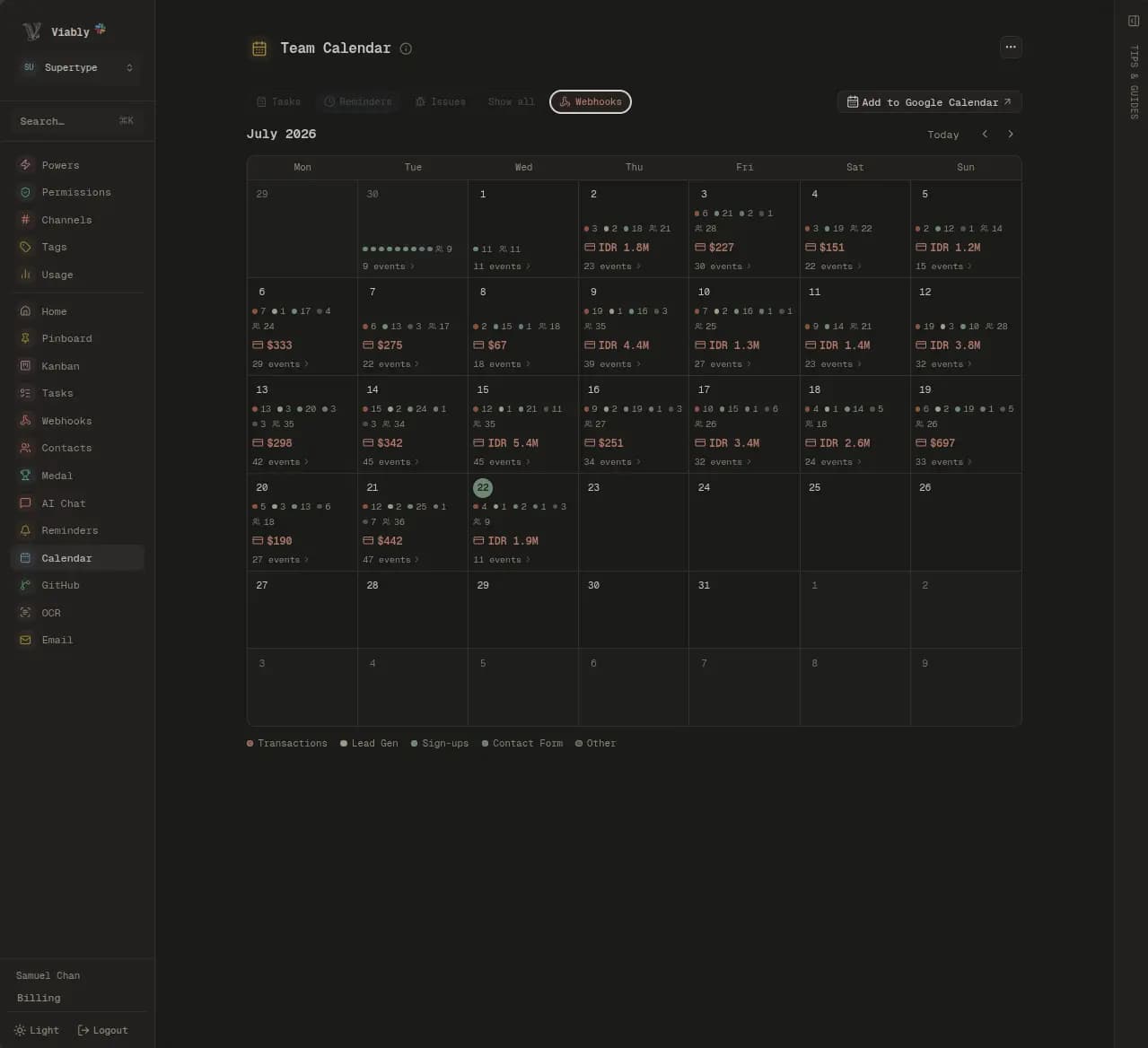
One shared calendar, scheduled from the conversation.
Each member links their own Google account, so Viably books as that person and reads their real availability. Ask for an hour that suits four people and you get a booked event back, with none of the messages that usually settle it.
What moves between Google and Viably.
The team calendar is owned by Viably and the availability is read from each member's own account. That split is what keeps one canonical shared calendar while still scheduling around real diaries.
Into Google
Mirroring is off until you turn it on, because a mirrored reminder is an event everybody on the shared calendar can read.- Events created from a reactionEvents created with /calendarSlots Via booked for youMirrored reminders
Back into Viably
Move an event in Google and Slack catches up, so both sides keep telling the same story.- Time changesGuest listCancellationsFree and busy
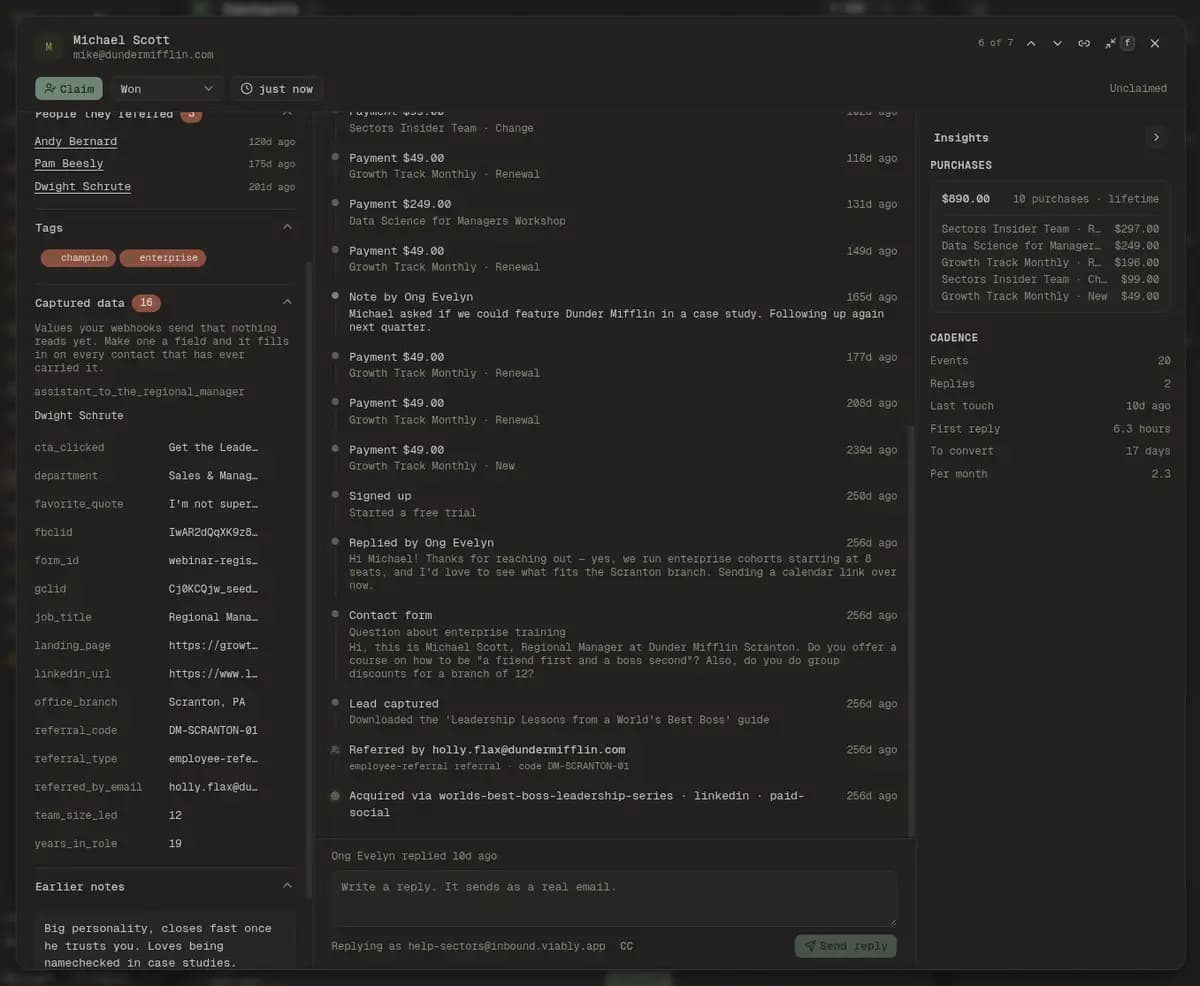
Onto the contact record
A meeting attaches to somebody already in your contacts and can never create one, so an entry involving nobody you track is read and discarded without a trace.- Meeting titleWhen it ranWho was in the room
Viably owns the shared calendar, and your own account stays yours.
The shared calendar is added to your Google account when you connect, so the workspace's events sit beside your own on every device and you can move one from Google as easily as from Slack. Your personal calendars stay private, and Viably never writes to them.
- One calendar the whole team schedules into
Everyone schedules into one shared calendar, and every meeting on it is visible to the whole team, invited or not.
- Availability comes from real diaries
Via checks free/busy for connected members before proposing a slot. Everyone else can still read the shared agenda.
- Disconnecting takes it all back
Revoking access removes the shared calendar from your list and clears your pending reminders from it. Events other people created stay put.
Personal free/busy stays private — Via reads whenyou're free to find a slot, never what you're doing.
React, run a command, or just ask.
Any of the calendar emoji on a message offers to turn it into an event. The /calendar command opens the agenda and creates one without a source message. And asking Via for thirty minutes with three named people is usually the fastest of the three, because it is the only one that also does the negotiating.
Locked it with Dunder Mifflin, kickoff Thursday 2pm on-site 🎉

Filled in from the message. Set a duration and book.
- Event
- Dunder Mifflin kickoff
- When
- Thu · 2:00 PM
- Where
- On-site
- Duration
- 1 hour
React 🗓️ on any message and Via turns it into an event card with the time, place and duration filled in. One tap books it on the shared calendar.
What am I on the hook for today, answered in one place.
Google events, Viably tasks, issues and reminders arrive on one list with the duplicates collapsed, so the answer does not require opening four surfaces and reconciling them by eye.
Tour the team calendarThe call you took last Tuesday, on the customer's record.
Add your workspace's shared address as a guest on an invite and the meeting lands on that contact's timeline beside their forms, emails and payments. It needs no calendar access at all, and a meeting involving nobody you track is never recorded anywhere.
Michael Scott
[email protected]Owned by jim
What happened when you reached out?
Note by jim
6d ago
Called after the pricing guide download. Evaluating for twelve seats, decision by end of month.
- via app-signups
Signed up
9d ago
Lead captured
12d ago
Pricing guide download
via webflow-forms- code CALVIN20
Referred by Jim Halpert
12d ago
Acquired via spring-launch · facebook · paid
12d ago
- Events
- 3
- Replies
- —
- Last touch
- 6d ago
- First reply
- —
- To convert
- —
Connect everybody, and the workspace price does not move.
There is no per-seat charge for linking a Google account, so the whole team is schedulable, including the people nobody would have bought a licence for. The Free plan carries the calendar in full, and Viably+ raises the limits on everything around it.
Questions about the Google Calendar integration
Whose calendar do events go into?
Can Via find a time that works for everyone?
What shows up in the agenda?
Does everyone have to connect an account?
What happens to my own Google Calendar when I connect?
Can meetings show up on a customer's CRM record?
If I log meetings, can my colleagues read my whole calendar?
Who can see my reminders if I mirror them?
What does disconnecting actually do?
Connect something else
Everything lands in the same record, so the second service you connect takes less setting up than the first.
Stop asking four people when they are free.
Connect a Google account, ask Via for an hour this week, and take the booking it comes back with.
- Free to start
- No credit card required
- Powers on when you need them